Cinematic Camera Controls
The cinematic camera API exposes Unreal Engine’s physical camera model to UnrealCV clients. It applies a shared filmback, lens, focus, crop, near-clipping, and physical-exposure configuration to the capture sensors that belong to a camera.
Activation and compatibility
The cinematic camera path is disabled by default. While it is disabled, the camera retains the established UnrealCV field-of-view and capture behavior.
Reading cinematic camera state does not enable the feature. Any cinematic
vset command other than explicitly disabling the feature enables the
cinematic camera path for that camera. Use the following command to return to
the legacy camera path:
vset /camera/0/cine/enabled 0
Disabling the feature restores the projection and post-process state that was active before the cinematic camera path was enabled. Cinematic settings are runtime state and are not persisted across application restarts.
State queries
vget /camera/[id]/cineReturn the complete cinematic camera state as JSON. The response contains
enabled,filmback,lens,focus,crop,exposure,near_clip,horizontal_fov_degrees, andvertical_fov_degrees.vget /camera/[id]/cine/enabledReturn
1when the cinematic camera path is enabled, or0when the legacy camera path is active.vget /camera/[id]/cine/intrinsicsReturn the active image dimensions, pinhole intrinsics
fx,fy,cx, andcyin pixels, horizontal and vertical fields of view in degrees, the two-element off-centerprojection_offset, and the row-major 4x4projection_matrixas JSON. The matrix is returned as a flat array of 16 values.
Configuration commands
vset /camera/[id]/cine/enabled [enabled]Enable or disable the cinematic camera path.
0disables it; any nonzero integer enables it.vset /camera/[id]/cine/filmback [width_mm] [height_mm] [offset_x_mm] [offset_y_mm]Set the sensor width, sensor height, horizontal sensor offset, and vertical sensor offset in millimeters.
vset /camera/[id]/cine/lens [focal_length_mm] [aperture_fstop]Set the current physical focal length in millimeters and the aperture in f-stops.
vset /camera/[id]/cine/lens_settings [min_focal_mm] [max_focal_mm] [min_fstop] [max_fstop] [min_focus_mm] [squeeze] [blades]Set the lens limits, minimum focus distance, anamorphic squeeze factor, and diaphragm blade count. Focal lengths and the minimum focus distance use millimeters.
bladesis an integer.vset /camera/[id]/cine/focus [distance_cm]Set the manual focus distance in centimeters.
vset /camera/[id]/cine/focus_mode [mode] [smooth] [smoothing_speed] [offset_cm]Set the focus method and focus interpolation settings. Supported modes are
manual,tracking,disable,none, anddo_not_override.smoothuses0or1;offset_cmis the focus-plane offset in centimeters.vset /camera/[id]/cine/focus_tracking [actor] [offset_x_cm] [offset_y_cm] [offset_z_cm]Track an actor by UnrealCV object name and apply a relative focus offset in centimeters. The command returns an error if the actor cannot be found.
vset /camera/[id]/cine/crop [aspect_ratio] [overscan] [crop_overscan] [scale_resolution]Set the crop aspect ratio and overscan, and control whether overscan is cropped and whether output resolution scales with overscan. The final two arguments use
0or1.vset /camera/[id]/cine/near_clip [enabled] [distance_cm]Enable or disable the custom near clipping plane and set its distance in centimeters.
vset /camera/[id]/cine/exposure [iso] [shutter_reciprocal] [physical_exposure]Set ISO, shutter speed, and whether physical camera exposure is applied. Shutter speed is expressed as a reciprocal value:
60means 1/60 s.physical_exposureuses0or1.
Example
The following sequence configures a 50 mm lens and manual focus, then reads the derived intrinsics:
vset /camera/0/cine/filmback 24.89 18.67 0 0
vset /camera/0/cine/lens_settings 18 135 1.4 22 15 1 9
vset /camera/0/cine/lens 50 2.8
vset /camera/0/cine/focus_mode manual 0 8 0
vset /camera/0/cine/focus 250
vset /camera/0/cine/exposure 100 60 1
vget /camera/0/cine/intrinsics
The first vset command automatically enables the cinematic camera path.
Focal-length terminology
vset /camera/[id]/focal [distance] [region] is the legacy depth-of-field
command. Its arguments control focal distance and focal region; they do not set
physical lens focal length in millimeters. Use
vset /camera/[id]/cine/lens for the physical lens model.
Development Cine camera guide
The development Cine camera path keeps the camera at one fixed transform while exposing Unreal’s physical filmback, lens, focus, crop, clipping, and exposure controls. This page also covers the parameter-oriented examples for the UnrealZoo development build.
Always record a short warm-up after changing a physical setting. Temporal history, auto exposure, and Lumen need a few rendered frames before a capture is representative.
Lens and filmback
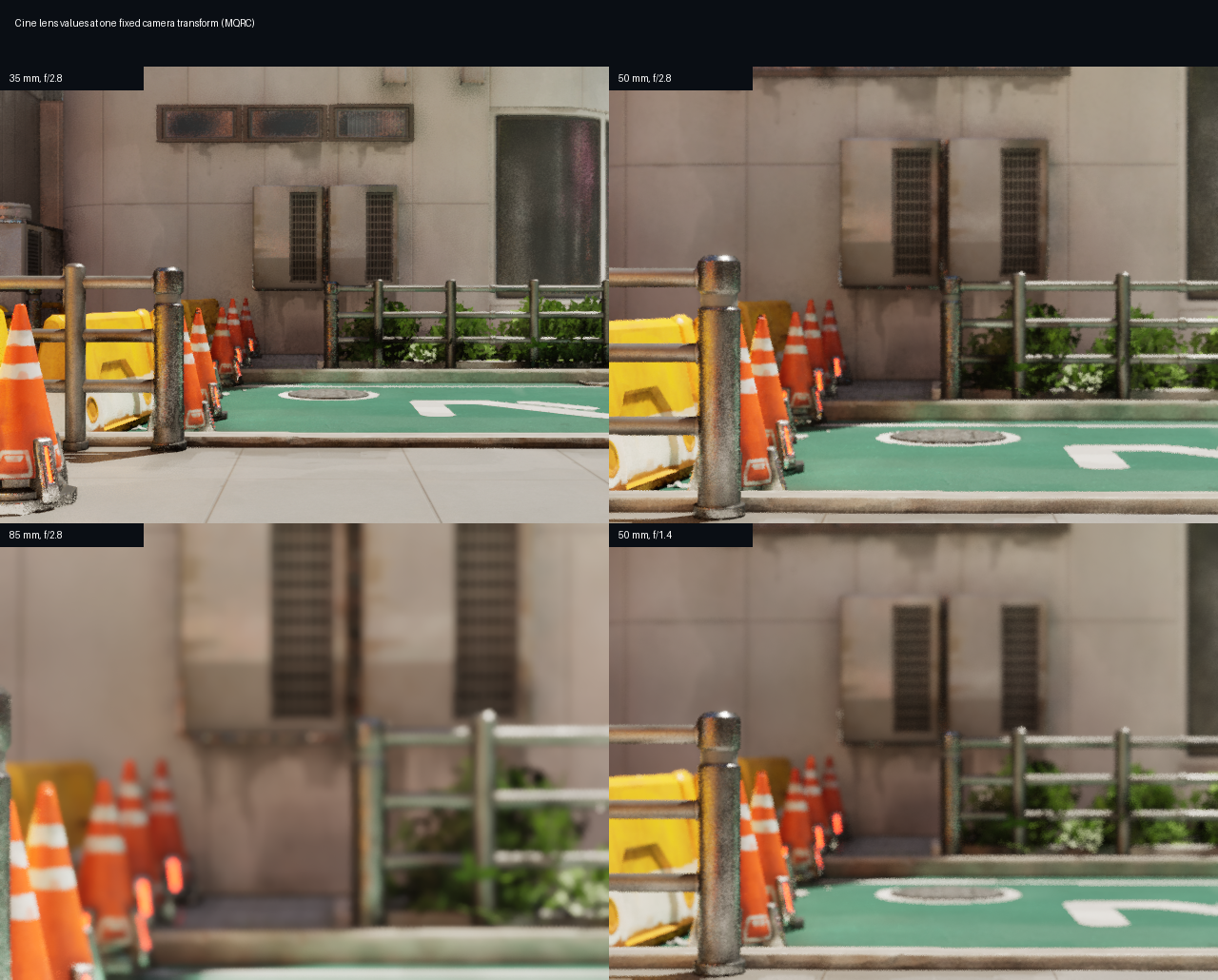
The following panels use the same camera location and rotation. Changing focal length changes framing; changing filmback changes the field of view without moving the camera. Aperture changes depth of field while preserving the camera transform.
Focus and exposure
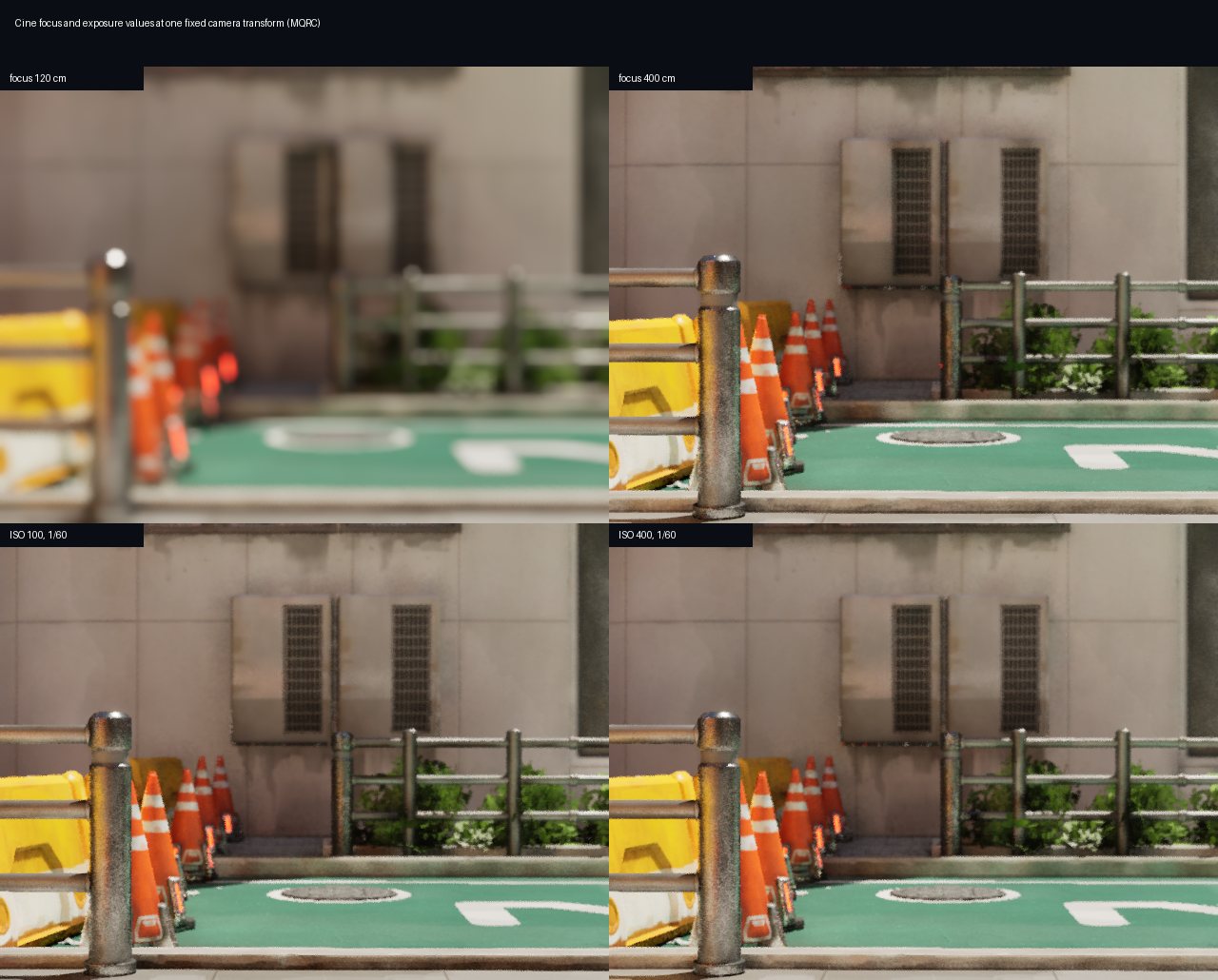
Manual focus is expressed in centimeters. ISO and shutter reciprocal are physical exposure controls; keep the scene and camera fixed when comparing values so the change is attributable to the parameter.
Focus-rack demos
The following fixed-view demos sweep the manual focus distance while capturing each frame through the Movie Quality Render Component (MQRC).
Reproduce the comparisons with commands such as:
vset /camera/0/cine/enabled 1
vset /camera/0/cine/lens 35 2.8
vset /camera/0/cine/focus 250
vset /camera/0/cine/exposure 100 60 1
vget /camera/0/cine/intrinsics
Crop, overscan, and near clipping are covered by the configuration commands above.
See also
Command System - Complete UnrealCV command reference
The Architecture Of UnrealCV - UnrealCV plugin architecture